
wcode 0.9.0
On this page4 sections

wcode 0.9.0 adds multi-agent task claims and change acceptance, and reorganizes the web and terminal workbenches. Tasks can carry a write scope, check results are tied to code revisions, and failures and pending work have a shared entry point.
wcode is a repository tool written in Rust. Through MCP, it gives coding assistants such as Codex and Claude Code tools to read source, find symbols, edit with revision checks, run verification, and keep the results. The coding assistant supplies the model.
What does “done” mean for this revision?#
Version 0.9.0 adds a native Change Acceptance workflow. A record brings together the current change, the project’s requirements, and the checks that actually ran. It can then show what is missing.
Suppose a task requires an API change, Rust tests, and static analysis. Running the tests alone leaves static analysis outstanding. If both pass and the code changes afterward, their results need another look. Where an independent review is required, the worker cannot fill that gap by writing “reviewed” in its own report.
The record binds Git’s base, head, tree, index, and working-tree state. It also keeps the design revision, check plan, and individual results. An absent check, a failed command, an outdated result, and a pending review remain separate states: they require different next steps.
You can inspect this directly from the CLI:
wcode acceptance inspect --base <full base SHA> --head <full head SHA> --json
wcode acceptance inspect --base <full base SHA> --head <full head SHA> --check
wcode acceptance history --json
--check succeeds only when the current native record is ready. A repository without an active project policy gets incomplete and policy_inactive; inspecting it does not enable a policy. inspect reads the state. acceptance verify runs the required checks.
Assign a write scope with each task#
Splitting a request into tasks does not stop two agents from editing the same file. “You implement it; someone else writes the tests” still leaves both free to adjust entry points, configuration, and dependencies.
Worklist tasks can now declare write_paths. The lead agent assigns directories along with the work; a review task can use an empty array. A worker calls worklist_claim to obtain its own token and handoff context. A claim is rejected if another active claim holds an overlapping write scope. Unfinished dependencies and revision mismatches also prevent a claim from proceeding.
Claims have a 15-minute lease, which longer tasks must renew. After a model or session change, the next worker can find the task, scope, and existing results in persistent state. On completion, worklist_submit returns its result and existing Evidence IDs for the lead agent to review.
File edits still check their SHA, and commands retain their permission checks. Worklist coordinates participating workers; an outside process using another tool can still write to the repository. The stale SHA will reject a subsequent guarded edit and require a fresh read. A claim is not an operating-system file lock.
Once the work comes back, the merged revision needs verification. Two branches passing separately does not establish that they pass together; the acceptance record needs to match the merged code.
Start the workbench with the problems#
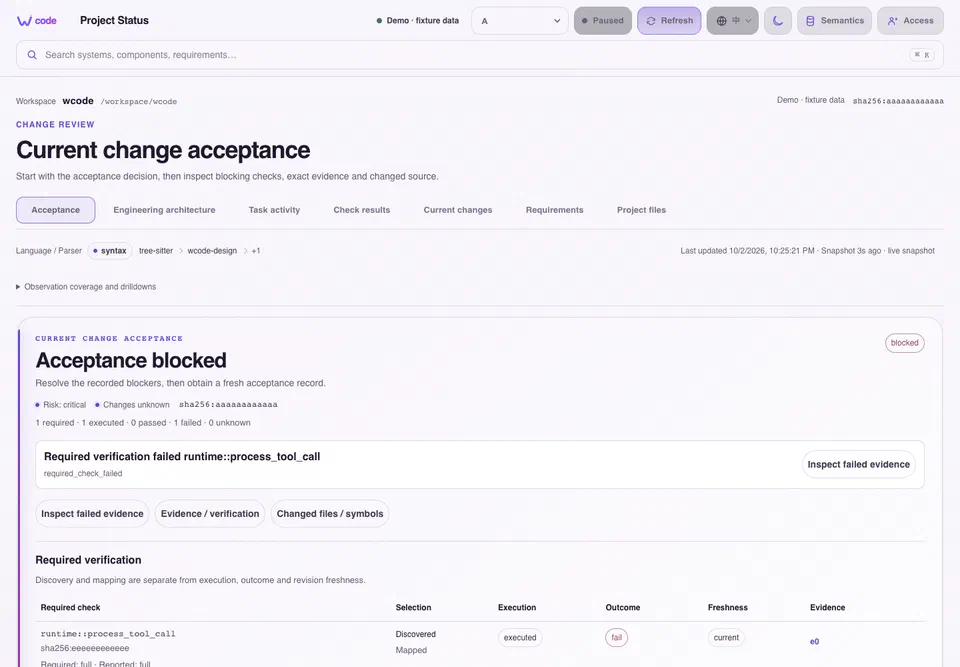
The actual 0.9.0 interface, populated with demonstration project data.
The web workbench and terminal observatory have both been reorganized. Failed checks, missing verification, conflicting evidence, missing design mappings, and large modules needing review feed a shared attention list. An item leads to the relevant source, task, or verification result.
There was already plenty of information in these pages. Finding the next step meant piecing it together. All seven web pages now keep the workspace, source revision, and snapshot state visible. The terminal has navigation for attention, tasks, providers, and agents, with help and stop controls retained in smaller windows.
The source viewer also fixes a detail that matters when another session is working nearby. Source is paged by line and bound to the SHA of the original read. If another agent edits the file between pages, the viewer requires a new read. It cannot assemble half an old file and half a new one. A response arriving after a workspace switch cannot overwrite the newly selected workspace either.
A few less visible fixes#
Journal and failure-memory locks are now scoped by workspace, so other repositories no longer wait on the same lock while one repository writes its records. Identical verification requests can share an execution, avoiding repeated checks.
Single-repository acceptance had another bug. Rust workspace discovery finds child crates automatically. The CLI counted those children as separately selected workspaces, then refused acceptance because it appeared to have more than one repository. It now checks the roots the user actually configured. Explicitly selecting two independent repositories still fails.
The Setup copy button had a smaller race. A clipboard operation can finish after the workspace or displayed command changes. Its old response must not show “copied” against the new content. A misleading success message is enough to send someone to the next step with the wrong command.
Handoffs also carry fewer repeated instructions and reconstructible routing details, while retaining source bodies, SHAs, checks, and failures. Valid context can be reused, with stale or missing parts fetched again.
With 0.9.0 installed, run wcode setup in the project directory to configure MCP, then reconnect the coding assistant. Run wcode for the terminal workbench; W opens project status and O opens Setup.
Packages and checksums are available through GitHub Releases. The 0.9.0 documentation covers the commands and changes in detail.